node.js (npm) 설치
Node.js — 어디서든 JavaScript를 실행하세요
Node.js® is a JavaScript runtime built on Chrome's V8 JavaScript engine.
nodejs.org
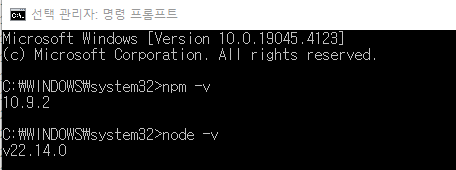
node.js 버전 확인
`npm -v`
`node -v`
react 프로젝트 생성
프로젝트 생성할 폴더 경로에서 `npx create-react-app 프로젝트명` 명령어 실행
# 예시) 프로젝트명: my-app
npx create-react-app my-app
react 프로젝트 실행
생성한 프로젝트 경로로 이동 후 `npm start`
cd my-app
npm start
오류해결
1. Vscode 나 Powershell에서 npx 오류나는 경우
npx : 이 시스템에서 스크립트를 실행할 수 없으므로 C:\Program Files\nodejs\npx.ps1 파일을 로드할 수 없습니다. 자세한 내용은 about_Execution_Policies(https://go.microsoft.com/fwlink/?LinkID=135170)를
 참조하십시오.
위치 줄:1 문자:1
+ npx create-react-app react-app
+ ~~~
    + CategoryInfo          : 보안 오류: (:) [], PSSecurityException
    + FullyQualifiedErrorId : UnauthorizedAccess
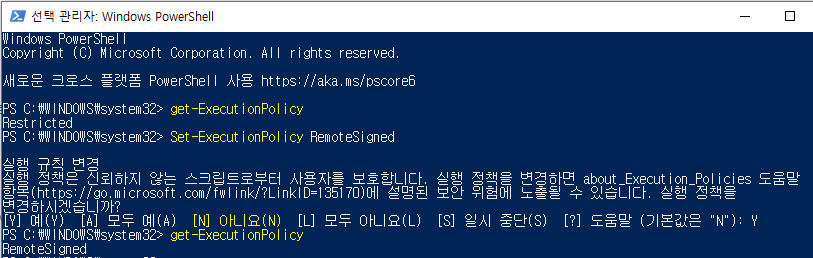
>> Powershell 권한 상태 변경 필요
1. 현재 권한상태 확인 : `get-ExecutionPolicy`
2. 현재 권한상태가 Restricted 인 경우 권한상태 변경 : `Set-ExecutionPolicy RemoteSigned` 후에 `Y`
2. 이전에 npm으로 전역적 설치했을 경우 버전 호환 문제
PS C:\Users\redjxsu\Documents\DevWork\ReactWork> npx create-react-app react-app

You are running `create-react-app` 5.0.1, which is behind the latest release (5.1.0).
We recommend always using the latest version of create-react-app if possible.

The latest instructions for creating a new app can be found here:
https://create-react-app.dev/docs/getting-started/

npm notice New major version of npm available! 10.9.2 -> 11.1.0
npm notice Changelog: https://github.com/npm/cli/releases/tag/v11.1.0
npm notice To update run: npm install -g npm@11.1.0
npm notice
>> npx로 설치하려면 기존에 전역적으로 설치했던거 제거 후 진행하기
`npm uninstall -g create-react-app`
* 참고 :
https://ko.legacy.reactjs.org/docs/create-a-new-react-app.html
'React' 카테고리의 다른 글
| Vscode에서 React 확장프로그램 (0) | 2025.08.12 |
|---|